

Getting Started
Core Concepts
ConfigDirector's core concepts and data model
Data Model
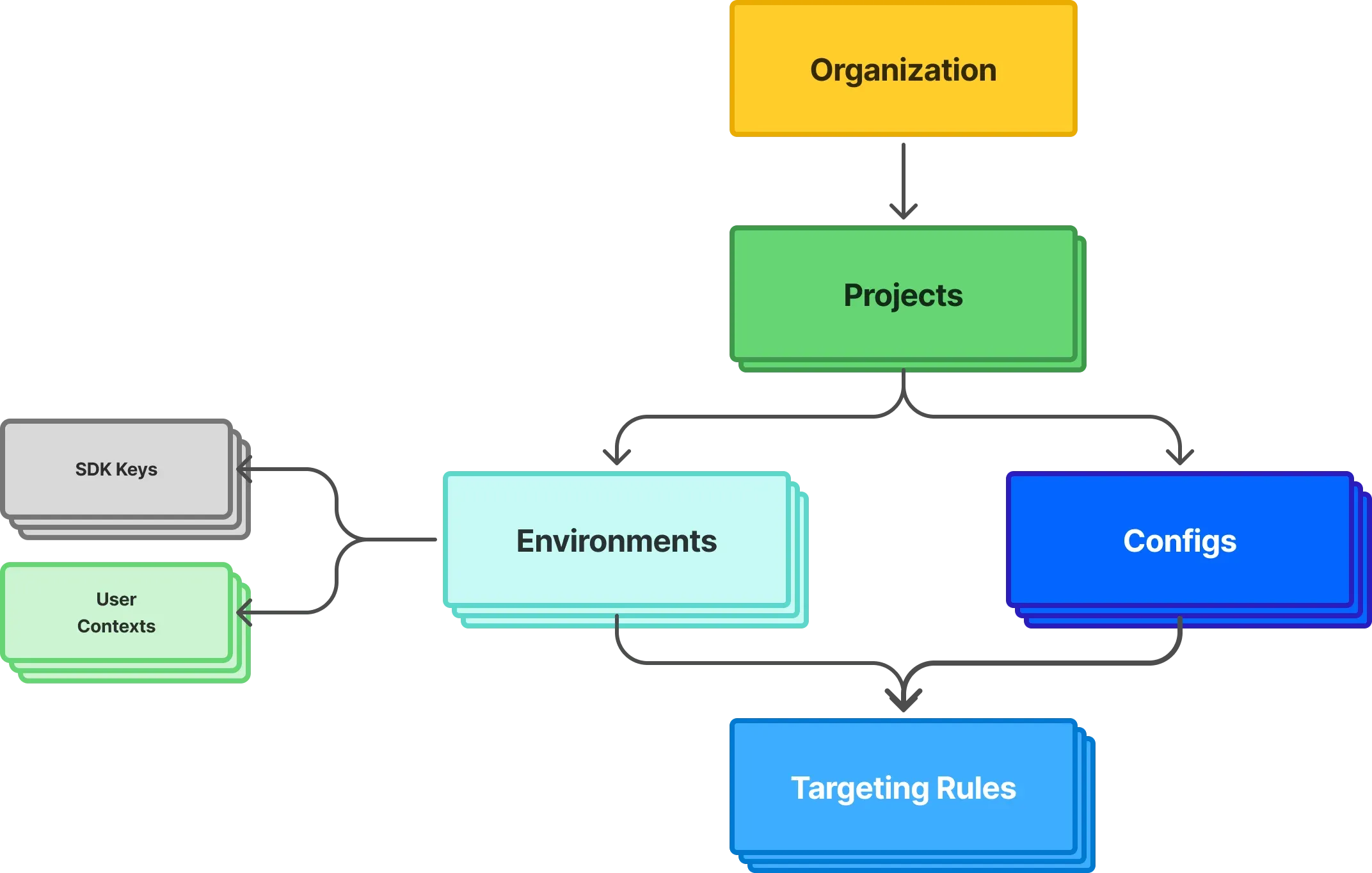
Organization
- All entities exist and are managed within an organization
- Users can belong to multiple organizations. If you belong to multiple organizations, when you visit your user profile you will see an option to switch your active organization.
Projects
- Projects are a way to organize related groups of configs together. They can be analogous to a product or application, to a product team, or however you'd like to use them.
- Configs belong to projects
- Each project defines an arbitrary number of environments. By default, the
TestandProductionenvironments are created automatically. - An organization can have many projects. On the Free option there is a limit on how many projects you can create, see Pricing and billing.
Environments
- Each project can have an arbitrary number of environments. However, we recommend to match the environments in your ConfigDirector project to the deployable environments for your application. The
TestandProductionenvironments are created automatically for each project. - Targeting rules for configs exist within an environment
- Client and server SDK keys belong to an environment. This means your application will need to configure the corresponding SDK key for each environment it is deployed to. Usually, this means providing the SDK keys via environment variables in your application.
- When you provide a user context via an SDK, that user context will exist within that environment (the environment the SDK key belongs to).
Configs
- Configs are an individual instance of a configuration value, feature flag, kill switch, or experiment.
- Configs belong to projects, and each project can have an arbitrary number of configs. On the Free option there is a limit on the total number of configs across your organization, see Pricing and billing.
- The value returned by a config for any given environment is defined via targeting rules.
Targeting Rules
- Each config, has a set of targeting rules for each environment defined in that project
- In each environment, the targeting rules end with a default targeting rule (the catch-all or fallback rule) whose value is returned when no other rule matches
- Targeting rules can have many rules with one or multiple conditions in each rule, as well as many percentage based rollouts.
- A condition tests either one attribute of the context (its identifier, its name, a trait, the app name, or the app version), or whether the context is in a segment. Every condition of a rule must match for the rule to apply.
- A trait that holds
trueorfalsecan be tested with "is true" or "is false". - Text and array conditions are case-sensitive. For example, a condition
context.traits /country is one of USdoes not match a context whosecountrytrait isus. If your application sends values in more than one casing, either normalize them before passing them to the SDK or list every casing as a target value. - While editing the rules you can check which value a given context would receive, and why, with the targeting rules tester
Segments
- A segment is a named set of users, such as beta testers, defined once per project and used by the targeting rules of any config in that project. See Segments.
- A segment's definition applies in every environment, unless an environment overrides it with its own
- Editing a segment applies right away to every config whose targeting rules use it
User Contexts
- User contexts are provided via the SDKs and belong to the environment that matches the SDK key being used
- User contexts may contain
id,name, andtraits. Thetraitsis an arbitrary JSON object - All of the attributes of a context may be used in targeting rules
SDK Keys
- SDK keys belong to and identify an environment within a project when using any of our SDKs
- There are client and server SDK keys. The documentation for each SDK will note which key should be used.
- Each environment can have up to five client SDK keys and five server SDK keys
- Server SDK keys are considered a secret. Server SDKs download the targeting rules in order to be able to evaluate targeting rules for any user context in memory without needing to reach ConfigDirector servers over the network for each evaluation.
- Since targeting rules may contain private or proprietary information, the server SDK key should be treated as a sensitive password
- Client SDK keys are not considered sensitive. This is because client SDKs only receive the final evaluated values.
Do NOT store secret or sensitive values, such as passwords, API keys, private keys, etc., in
config values. ConfigDirector is not designed to be a secrets vault and does not provide the level of security controls required to guard secret or sensitive information.