

Quickstart
Welcome to ConfigDirector, a cloud service to manage remote configuration and feature flags.
In this section we'll walk you through:
- Creating your first config
- Installing and configuring an SDK
- Retrieving the config in your app via the SDK
- Configuring user contexts and targeting rules
1. Create your first config
- Sign in to the ConfigDirector dashboard. You'll be prompted to create a free account if you don't have one. Don't worry, it's free to start and does not require a payment method. You can start pay as you go later if you need more than the free allowance.
- Click on the
Createbutton next to theConfigsnavigation to create a new config. - Enter a key (the key is both the name and how you'll reference it in code) for the config, adjust other selections, and save it.
2. Install and configure an SDK for your language and framework
- Retrieve your client and server SDK keys by going to
SDK keysin the dashboard's navigation panel. - Select each environment to access its client and server SDK keys.
- Install and configure an SDK for your application stack:
npm install --save @configdirector/client-sdk
yarn add @configdirector/client-sdk
pnpm add @configdirector/client-sdk
bun add @configdirector/client-sdk
import { createClient } from "@configdirector/client-sdk";

export const client = createClient("YOUR-CLIENT-SDK-KEY");
await client.initialize();
npm install --save @configdirector/react-native-sdk
yarn add @configdirector/react-native-sdk
pnpm add @configdirector/react-native-sdk
bun add @configdirector/react-native-sdk
import { View } from "react-native";
import AwesomeApp from "./AwesomeApp";
import { ConfigDirectorProvider } from "@configdirector/react-native-sdk";

export default function App() {
  return (
    <ConfigDirectorProvider
      sdkKey={"YOUR-CLIENT-SDK-KEY"}
      appName="MyAwesomeApp"
      appVersion="1.0.0">
      <View>
        <AwesomeApp />
      </View>
    </ConfigDirectorProvider>
  );
};
npm install --save @configdirector/server-sdk
yarn add @configdirector/server-sdk
pnpm add @configdirector/server-sdk
bun add @configdirector/server-sdk
import { createClient } from "@configdirector/server-sdk";

// IMPORTANT: Do not commit the server SDK key to your source code, it is a secret value.
export const client = createClient("YOUR-SERVER-SDK-KEY");
await client.initialize();
npm install --save @configdirector/nextjs-sdk
yarn add @configdirector/nextjs-sdk
pnpm add @configdirector/nextjs-sdk
bun add @configdirector/nextjs-sdk
export async function register() {
  const { register } = await import("@configdirector/nextjs-sdk/server");
  await register({
    // The server SDK key is a secret value, do not commit it to your source code repository.
    // In this example, we are assuming the environment variable CONFIGDIRECTOR_SERVER_SDK_KEY
    // will be populated at runtime with your server SDK key in the server environment
    serverSdkKey: process.env["CONFIGDIRECTOR_SERVER_SDK_KEY"]!,
  });
}
import { ConfigDirectorProvider } from "@configdirector/nextjs-sdk/server";
import type { ReactNode } from "react";

export const dynamic = "force-dynamic";

export default async function RootLayout({ children }: { children: ReactNode }) {
  return (
    <html lang="en">
      <body>
        <ConfigDirectorProvider sdkKey={process.env["CONFIGDIRECTOR_CLIENT_SDK_KEY"]!}>
          <main>{children}</main>
        </ConfigDirectorProvider>
      </body>
    </html>
  );
}
npm install --save @openfeature/web-sdk @configdirector/openfeature-web-provider
yarn add @openfeature/web-sdk @openfeature/core @configdirector/openfeature-web-provider
pnpm add @openfeature/web-sdk @openfeature/core @configdirector/openfeature-web-provider
bun add @openfeature/web-sdk @openfeature/core @configdirector/openfeature-web-provider
import { OpenFeature } from "@openfeature/web-sdk";
import { ConfigDirectorProvider } from "@configdirector/openfeature-web-provider";

const provider = new ConfigDirectorProvider("YOUR-CLIENT-SDK-KEY");
await OpenFeature.setProviderAndWait(provider);
const client = OpenFeature.getClient();
3. Retrieve config values
import { client } from "./config-director-setup"

// Retrieve the current value
const value = client.getValue("my-config-key", false);

// Subscribe to value updates
const unwatchMyKey = client.watch(
  "my-config-key",
  false,
  (newValue) => {
    console.log("Value updated:", newValue)
  },
);

unwatchMyKey(); // Call the unwatch function returned to remove the listener

client.unwatch("my-config-key"); // Removes all listeners for that key
import { useConfigValue } from "@configdirector/react-native-sdk";

function YourComponent() {
  const { value } = useConfigValue("my-config-key", false);

  return <p>my-config-key: {value}</p>;
}

export default YourComponent;
Retrieving config values via getValue, and subscribe to updates via watch:
import { client } from "./config-director-setup"

// Retrieve the current value
client.getValue("my-config-key", false);

// Subscribe to value updates
const unwatchMyKey = client.watch("my-config-key", false, (newValue) => {
  console.log("Value updated:", newValue);
});

unwatchMyKey(); // Call the unwatch function returned to remove the listener

client.unwatch("my-config-key"); // Removes all listeners for that key
Retrieving config values in client components:
"use client";

import { useConfigValue } from "@configdirector/nextjs-sdk/client";

function YourComponent() {
  const { value } = useConfigValue("my-config-key", false);

  return (<p>my-config-key: {value}</p>);
}

export default YourComponent;
Retrieving config values in server routes:
import { getConfigClient } from "@configdirector/nextjs-sdk/server";

export async function GET() {
  const client = getConfigClient();
  const value = client.getValue("my-config-key", false);
  return Response.json({ "my-config-key": value });
}
const booleanValue = client.getBooleanValue("my-config-key", false);

const stringValue = client.getStringValue("my-string-config-key", "Default");
4. Configure user contexts and targeting rules
- With any of our SDKs you can provide an optional user context with attributes that can be leveraged in targeting rules. Choose your SDK for instructions on how to provide a user context:
A user context can be provided when initializing the client:
import { createClient } from "@configdirector/client-sdk";

export const client = createClient("YOUR-CLIENT-SDK-KEY");
await client.initialize({
  id: "12345",
  name: "Example User",
  traits: {
    region: "North America", // Any arbitrary traits which can be referenced in targeting rules
  }
});
The user context can also be updated via updateContext:
import { client } from "./config-director-setup"

await client.updateContext({
  id: "654321",
  name: "Another User",
  traits: {
    region: "Australia",
  },
});

// Update it to `undefined` (anonymous user context) when a user signs out
await client.updateContext();
A user context can be provided when initializing the provider:
import { View } from "react-native";
import AwesomeApp from "./AwesomeApp";
import { ConfigDirectorProvider } from "@configdirector/react-native-sdk";

export default function App() {
  return (
    <ConfigDirectorProvider
      sdkKey={"YOUR-CLIENT-SDK-KEY"}
      appName="MyAwesomeApp"
      appVersion="1.0.0"
      context={{ id: "12345", name: "Example User", traits: { region: "North America" } }}>
      <View>
        <AwesomeApp />
      </View>
    </ConfigDirectorProvider>
  );
};
The user context can also be updated with the useContext hook:
import { useConfigValue, useContext } from "@configdirector/react-native-sdk";

function YourComponent() {
  const { value } = useConfigValue("my-config-key", false);
  const { updateContext } = useContext();

  useEffect(() => {
    updateContext({
      id: "654321",
      name: "Another User",
      traits: {
        region: "Australia",
      },
    });
  }, []);

  return <p>my-config-key: {value}</p>;
}

export default YourComponent;
The user context can be provided as the third argument to getValue. Unlike client SDKs, the server SDKs are able to evaluate targeting rules for the given user context locally without additional network calls.
import { client } from "./config-director-setup"

client.getValue("my-config-key", false, {
  id: "12345",
  name: "Example User",
  traits: {
    region: "North America", // Any arbitrary traits which can be referenced in targeting rules
  },
});
It can also be provided as the fourth argument to watch:
import { client } from "./config-director-setup"

const unwatchMyKey = client.watch(
  "my-config-key",
  false,
  (newValue) => console.log("Value updated:", newValue),
  {
    id: "12345",
    name: "Example User",
    traits: {
      region: "North America",
    },
  },
);
The user context can be updated with the useContext hook:
"use client";

import { useEffect } from "react";
import { useConfigValue, useContext } from "@configdirector/nextjs-sdk/client";

function YourComponent() {
  const { value } = useConfigValue("my-config-key", false);
  const { updateContext } = useContext();

  useEffect(() => {
    updateContext({
      id: "654321",
      name: "Another User",
      traits: {
        region: "Australia",
      },
    });
  }, []);

  return <p>my-config-key: {value}</p>;
}

export default YourComponent;
On server routes, the user context is provided at evaluation time as the third argument to getValue. Unlike client SDKs, the server SDKs are able to evaluate targeting rules for the given user context locally without additional network calls.
import { getConfigClient } from "@configdirector/nextjs-sdk/server";

export async function GET() {
  const client = getConfigClient();
  const value = client.getValue("my-config-key", false, {
    id: "654321",
    name: "Another User",
    traits: {
      region: "Australia",
    },
  });
  return Response.json({ "my-config-key": value });
}
await OpenFeature.setContext({
  targetingKey: "12345", // In OpenFeature, the `targetingKey` represents the context's user ID
  name: "Example User",
  traits: {
    region: "North America", // Any arbitrary traits which can be referenced in targeting rules
  }
});
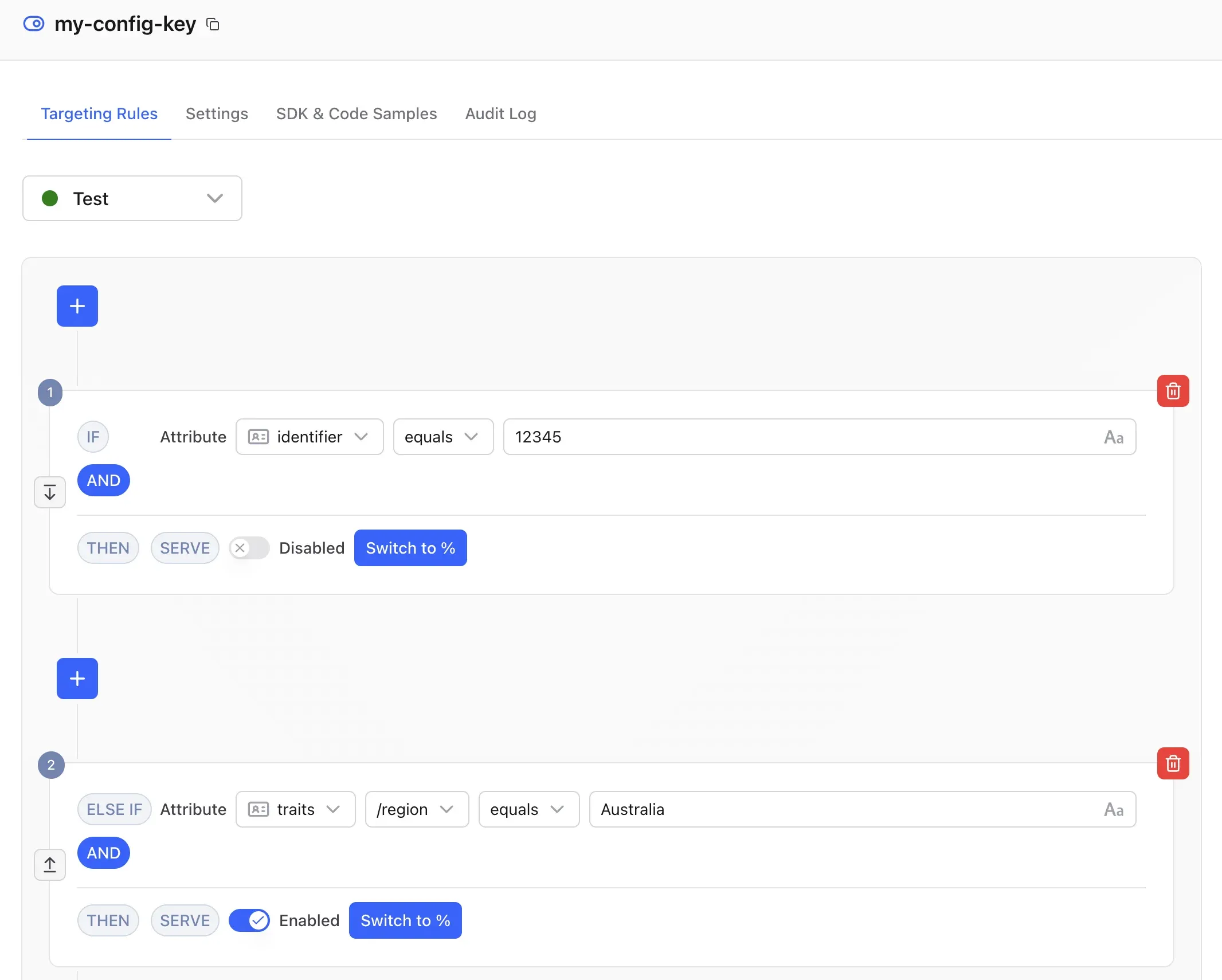
- You can now configure targeting rules by navigating to your config in the dashboard. Targeting rules are the very first tab on the config view:
Next steps
Prefer to manage projects, configs, targeting rules, and segments as code, or from an AI coding assistant? See the Terraform provider and the MCP server.